

My Store
Seplos USB RS485 Diagnostic Cable
Seplos USB RS485 Diagnostic Cable
Couldn't load pickup availability
Seplos USB RS485 Diagnostic Cable – Professional BMS Access Tool
This USB RS485 Diagnostic Cable kit provides everything required for direct diagnostic and configuration access to Seplos-based battery systems via the RS485 port. Designed for installers, engineers, and advanced users, the cable enables detailed visibility of battery health, cell data, protection status, and system performance.
Compatible Systems
This cable is compatible Seplos-based battery systems including:
- Seplos V2 / V3 / V4 BMS
- Seplos Mason battery systems
- Re-branded batteries using Seplos BMS hardware, Fogstar, Shoto, Lithium batteries South Africa (LBSA), Trophy battery and many others.
⚠️ Important: Many batteries are re-branded. If you’re unsure which BMS your battery uses, send us a clear photo of the BMS or data label and we’ll confirm compatibility before purchase.
Key Features
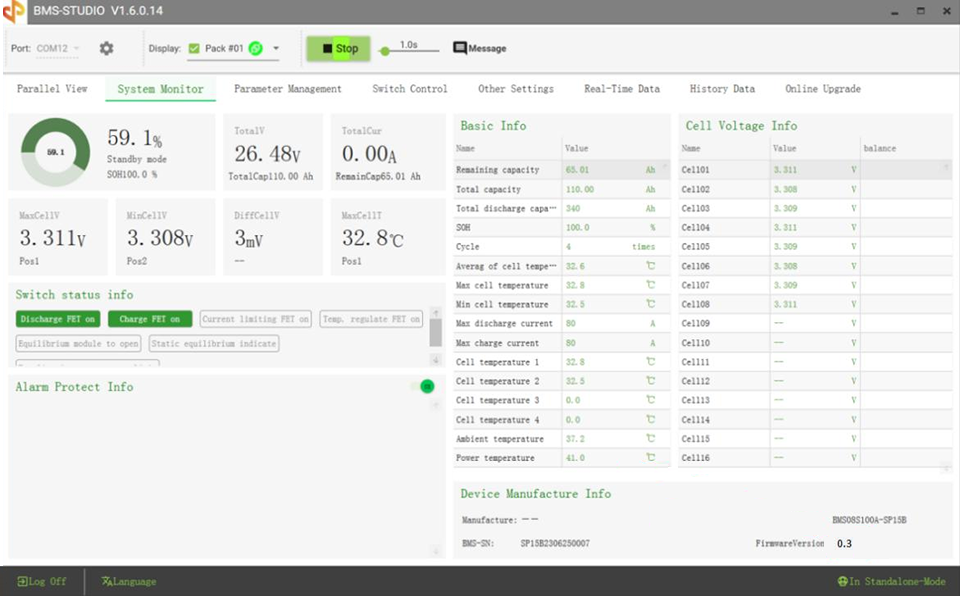
✔ Comprehensive Diagnostics – Access cell voltages, balance status, temperatures, alarms, SOC, SOH, and protection states
✔ Configuration & Monitoring – Works with Seplos BMS Studio (configuration) and Seplos Battery Monitor (real-time monitoring)
✔ Plug-and-Play USB Interface – Includes drivers compatible with Windows 7 through Windows 11
✔ RS485 Direct Communication – Reliable wired connection for commissioning, fault-finding, and parameter adjustment, and firmware flashing
✔ Status LEDs – Integrated RX/TX indicators provide instant feedback on data transmission
✔ Single or Multi-Pack Access – Communicate with the master BMS in multi-battery systems to view the entire bank
✔ Home Assistant & Solar Assistant Compatible - tested and works with solar assistant.
Monitor & Configure Critical Battery Data
Using this cable, you can access and manage key parameters including:
🔹 Cell Voltage & Balancing – Identify imbalance issues and verify balancing behaviour
🔹 Battery Temperatures – Monitor individual cell and BMS temperature sensors
🔹 State of Charge (SOC) & State of Health (SOH) – Track usable capacity and long-term degradation
🔹 Charge & Discharge Data – View current, voltage, power, and historical cycle counts
🔹 Protection & Alarm Status – Diagnose over-voltage, under-voltage, temperature, and current events
🔹 BMS Configuration Parameters – Adjust limits, thresholds, and communication settings using BMS Studio
🔹 Firmware Information – Read BMS hardware and firmware versions for compatibility checks
Cable Specifications
-
Total Length: 2.5 m
(2.0 m from RS485 connector to battery + 0.5 m USB cable) - USB Extension Support: Additional 5 m USB extension supported (high-quality cable recommended).
- Indicators: Power, RX, TX LEDs for real-time communication feedback
- Interface: USB to RS485 (isolated)
Software Disclaimer
Configuration, monitoring, and firmware tools are provided by the BMS manufacturer and remain their intellectual property. We provide guidance and links to the official manufacturer-supplied software, which is freely available from the relevant manufacturer’s website or support channels at the time of purchase. We offer guidance, setup instructions as needed to allow you to get connected to your battery.
Software features, availability, and compatibility may vary depending on BMS model and firmware version.
Share